Select Report Localization
link  on
the left navigation bar on the Report Administration main page.
on
the left navigation bar on the Report Administration main page.
A user can enable a report to display in a specified locale and set the report to render in a Dynamic or Static manner. When set to Dynamic, the report will be dynamically translated to the user's locale when the report is displayed. When set to Static, the report will be created specifically for the locale.
Access to the Report Localization user group permission is required to configure report locale settings.
Select Report Localization
link on
the left navigation bar on the Report Administration main page.
The Report Localization main page will display.
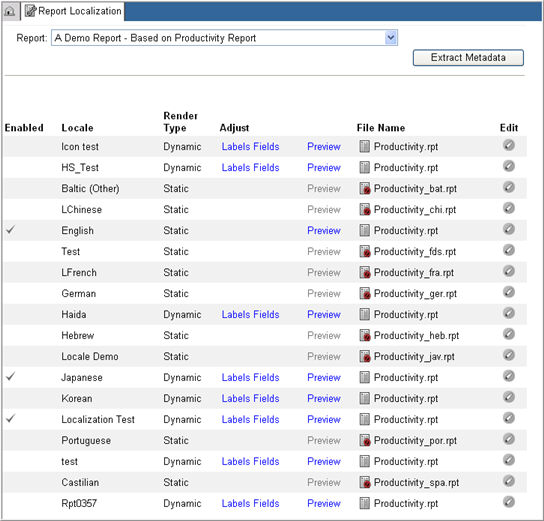
Select a Report Name from the drop down list of Report names in the Rave installation to edit the settings.
In the data grid, select a
locale you want to edit and click the Edit
icon  for the locale.
The locale settings for Enabled and Render Type columns will display in edit mode.
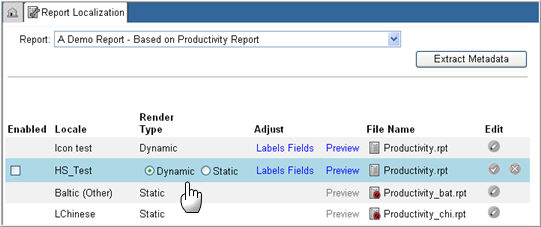
Check box the Enabled column to make the report available for rendering in the specified locale. If left unchecked, the report will not be available for the specified locale.
Note: If the user attempts to review the report for a disabled report locale, the report will display in the report's default locale.
For Render Type, select Dynamic or Static. Selecting Dynamic will dynamically translate the report in the user's locale when the report is rendered. Selecting Static will not translate the report to the user's locale language. The report will be created specifically for the selected locale.
Note:
If a new locale is created all existing report for the newly created locale will have a Dynamic render type.
If a new report is created all of the report locales for that report will have a Dynamic render type except for the report’s default locale. The default locale will have Static render type.
Click Save  to update the changes or click Cancel
 to discard your changes.

Copyright © 2010 Medidata Solutions, Inc. All rights reserved.