Navigate to a Study > Site > Subject > Form.
Click marking  to the right of the data entry field.
Markings are notes that are associated with data fields on a form. You must have permission to create, change, respond, cancel, acknowledge, close, delete, or view the marking. A form that has a marking requires follow-up, correction or clarification.
There are three types of markings:
Protocol Deviations - used when an event or timing differs from what is stated in the protocol.
Sticky Notes - used for reminders and communication with another user.
Queries - can be system generated or manual.
Navigate to a Study > Site > Subject > Form.
Click marking
to the right of the data entry field.
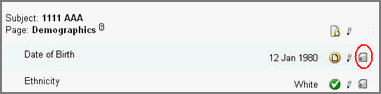
A dropdown displays marking type selection.
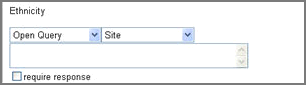
Select a Marking type (Protocol Deviation, Sticky Note, Query).
Select an appropriate Marking group.
(Optional) Enter a comment of up to a 1000 characters in the text box.
Select Require Response if you need a response.
Click Save.
The system reloads and the Marking type displays.


Copyright © 2014 Medidata Solutions, Inc. All rights reserved.